
Before switching careers and becoming a full-time author, I was working as a freelance web developer for almost 18 years. I’ve built hundreds of websites for individuals, startups, and businesses with large projects, and one thing that has remained common over the last half-decade is Rank Math SEO.
It’s one of the first plugins I always install, because most of what I’ll be creating next will be based on it. And when I say “most”, I don’t necessarily refer strictly to search engine optimization, but to so much more, because Rank Math SEO offers more features and options than one may imagine.
It doesn’t matter if you’re an amateur author or writer who just started their journey or a highly professional and full-time author who’s published multiple books already; if you own a website, you need a tool to optimize it.
So, here’s what I’ll be focusing on in this guide:
- Download, install, and quickly and easily set up Rank Math SEO (even if you’re already using another SEO plugin).
- Optimize the most important parts of every author’s website.
- Claim your entity with advanced Schema Markups.
After completing this guide, you’ll have a fully optimized website and enough skills to continue optimizing it even further.
A quick note: Because there are many beginners who have no idea what is Rank Math SEO, how to install or configure plugins, and have never heard some of the words I’ll be typing next, I’ll try to explain everything with as much detail as possible. If you’re already an expert, feel free to skip any part you’re already familiar with.
Common things to know (for beginners)
Before we get started, it’s important to understand what we’re talking about – if you’re a beginner, that is.
What does SEO stand for?
SEO stands for ‘Search Engine Optimization,’ and its goal is to rank your content as high as possible in traditional search engine results, such as in Google and Bing. It’s about focusing on keyboards, backlinks, the technical side of things, like the overall health of the website, along with the user experience.
What does GEO stand for?
GEO stands for ‘Generative Engine Optimization‘ and is all about optimizing our content to be cited and displayed by AI-powered search engines like Google’s Search Generative Experience, Perplexity, etc. Using authoritative citations, statistics, and using a clear language that AI models can easily parse and synthesize for their own results.
What does AEO stand for?
AEO stands for ‘Answer Engine Optimization‘ and is all about optimizing our content to provide simple and definite answers to specific questions. This is helpful if we want our content to be used by voice assistants (like Alexa or Siri) or ‘Position Zero’ snippets. We typically use Q&A formats and structured data using Schema markups to make things easier.
What is WordPress?
WordPress is the most popular platform in the world for building and maintaining websites (blogs, e-commerce stores, portfolios, business sites, and more). It’s being used by over 42% of all websites running on the Web, and has a huge community of developers and contributors who constantly help improve it and build tools for it.
What are WordPress plugins?
Think of plugins as apps for your website. You want a contact form? You can install a plugin that allows you to create custom contact forms. You want polls or fancy tables? Maybe to display your latest Instagram posts automatically? Basically, whatever you’re looking for, there’s usually a plugin for it. Rank Math SEO is a WordPress plugin that allows you to easily optimize your site and content.
Editor’s note: You can see the images in full size just by clicking on them (for mobile devices, it’s better to look at them in landscape mode).
What is Rank Math SEO?
Co-founded by Bhanu Ahluwalia, Nimit Kashyap, and Suraj Vibhute, and with a team of over 20 people, Rank Math SEO is one of the most popular optimization WordPress plugins in the world, with over 4 million active installations.
Rank Math SEO is a free (with paid tiers available) WordPress plugin with over 4 million active installations right now. It began as a solution for people who wanted to optimize their websites and content for search engines like Google and Bing, but it has now evolved into an all-in-one solution for large language models (LLMs) too, such as ChatGPT, Claude, Gemini, etc.
But apart from the basic optimization, what made me fall in love with it was all the modules and blocks they offer, where the real power lies. Basically, you can enable or disable any modules that you don’t use, you can create cool Schema Markups and insert them into your posts and pages, and so much more that will significantly improve your content’s structure.
The free version is robust, with lots of great features and options that will allow you to optimize your content with ease. But the real power is behind the Pro version, which offers all those modules and pre-made markups that you can insert with 1 click.
How much does it cost?

Rank Math SEO Pro is the cheapest plan right now, and it starts at $7.00 per month, but billed annually. Considering how much more expensive it would have been to hire an SEO expert to do most of those things, I’d say it’s cheap enough to be worth the price.
With this plan, which I’ve also been using, you can install Rank Math SEO Pro on unlimited personal websites, track up to 1,000 keywords, access their powerful schema generator, use their AI Link Genius and link checker, and so much more that you can see from the attached image.
How to install and setup Rank Math SEO
Just to showcase Rank Math’s abilities, the following step-by-step guide has been created using the “HowTo” block offered by the SEO plugin.
How to install, configure, and migrate from any WordPress SEO plugin to Rank Math SEO in less than five minutes.
Total Time: 5 minutes
Install Rank Math SEO

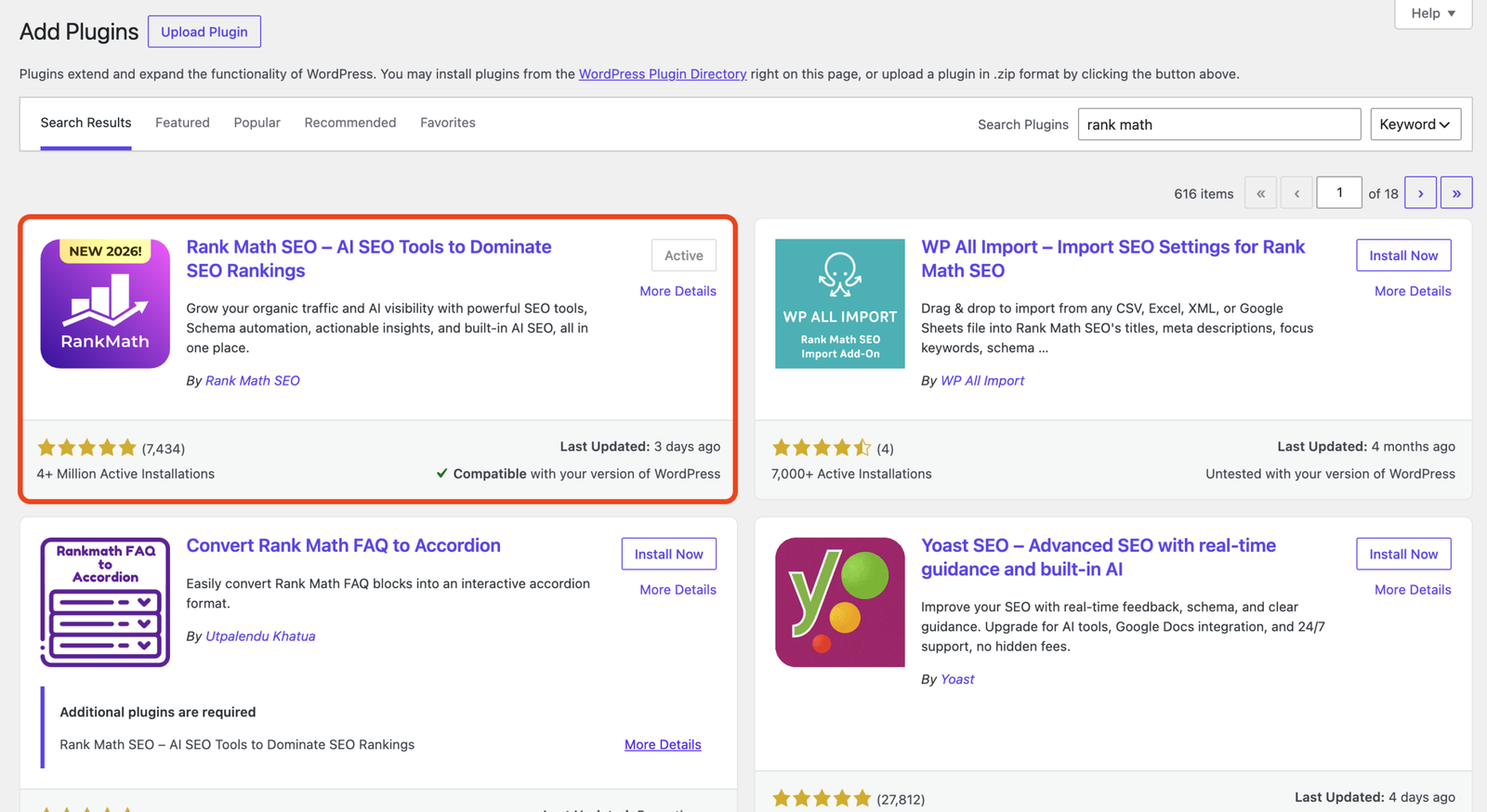
The first step is to install Rank Math SEO. You can do that by logging in to your WordPress Dashboard -> Plugins -> Add New -> search for ‘Rank Math‘ and click ‘Install‘. If you want the Pro version, don’t activate the free version just yet. But if you don’t, go ahead and activate the plugin.
Download and install the Pro version

First, head over to RankMath.com and choose one of their plans. I went with the ‘PRO’ version (which says that it’s “Perfect For Bloggers, Individuals & Solopreneurs”. Just click on the “Buy Now” button, add your details, and complete the payment.
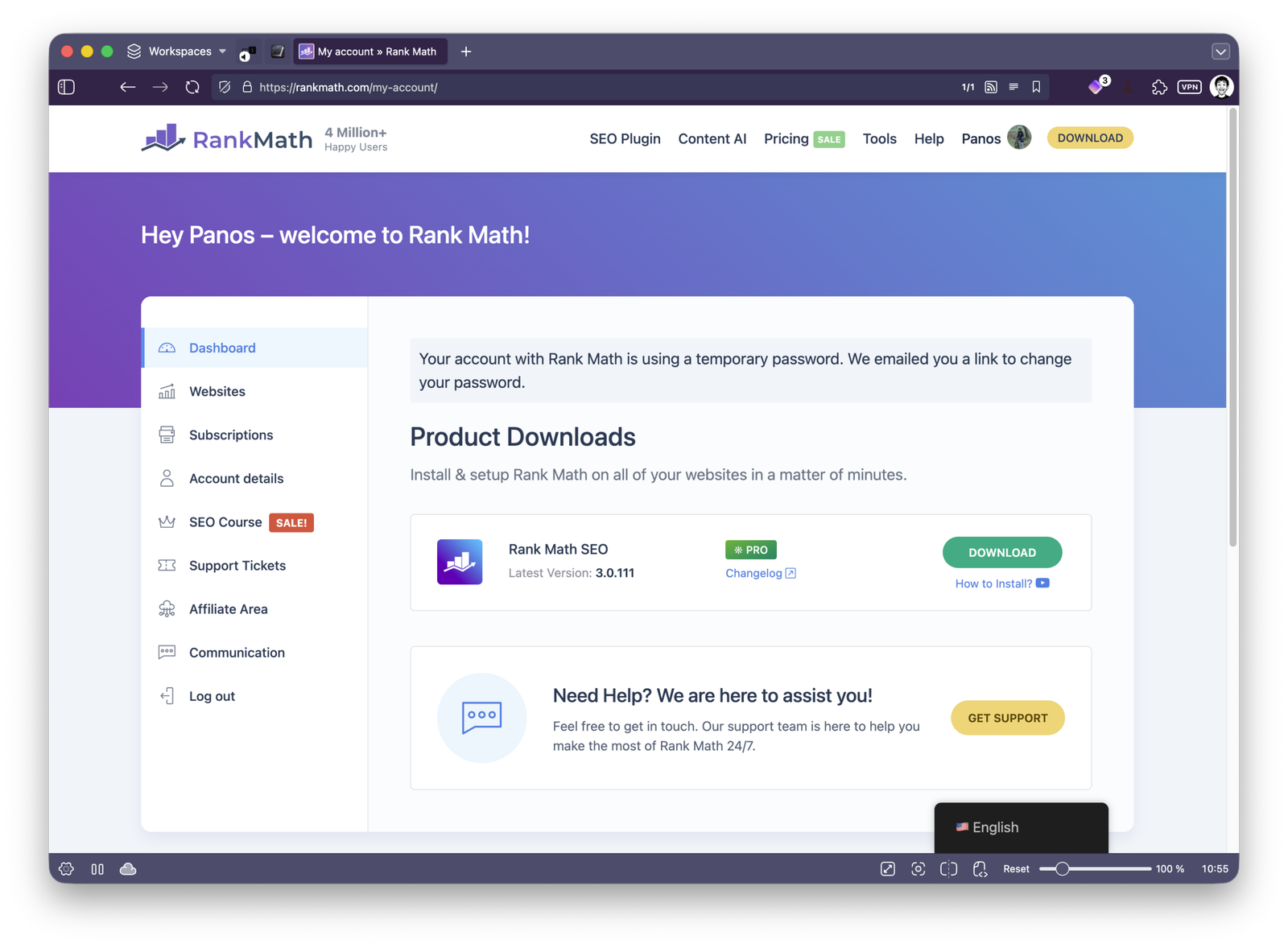
Once you do that, go to the ‘My Account‘ page and click on the “Download” button. Then go to your WordPress Dashboard -> Plugins -> Add Plugin -> Upload Plugin -> select the zip file you downloaded and make sure to install and activate it.
Setting up and migrating to Rank Math SEO
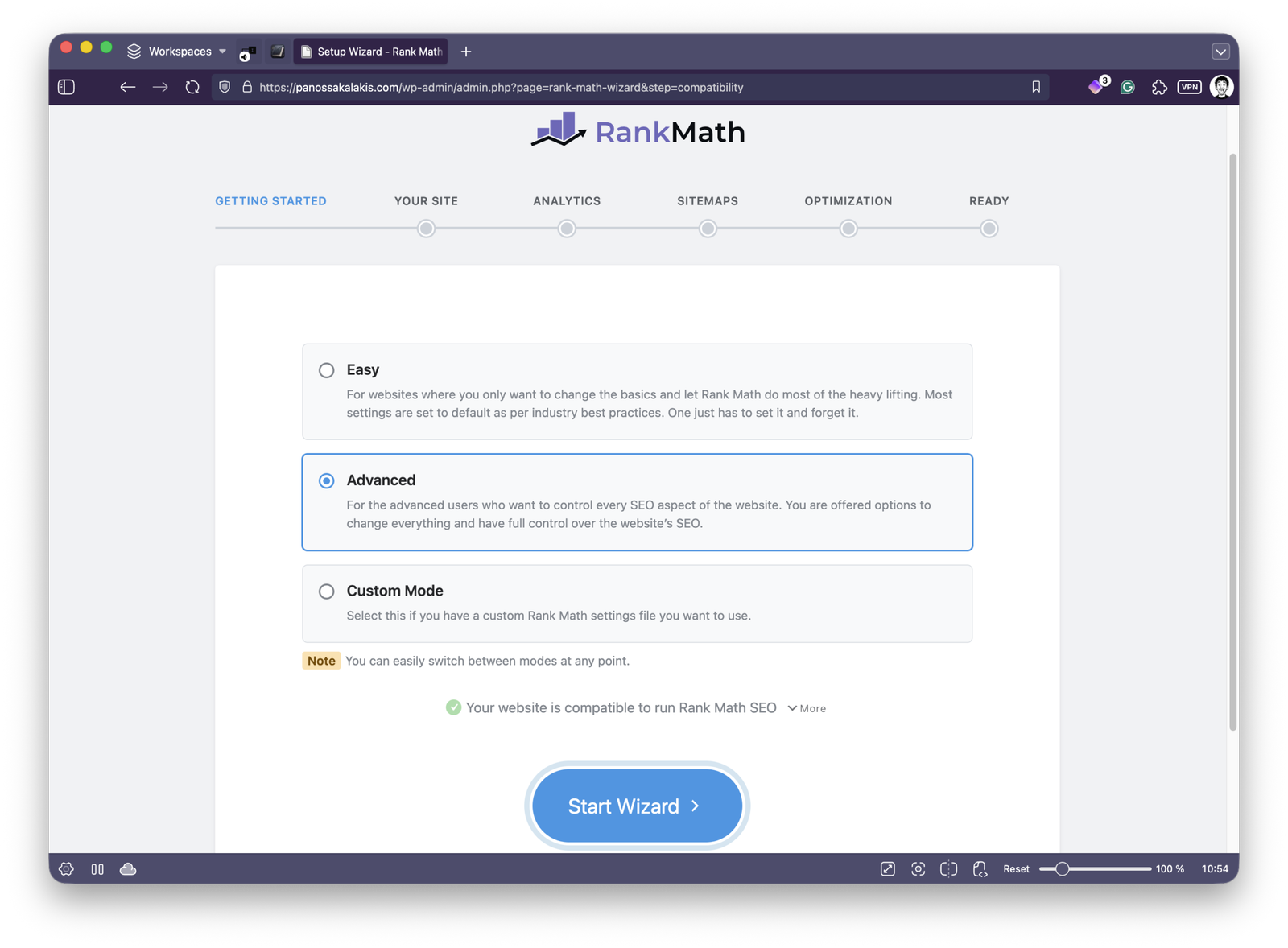
Rank Math has a ‘Setup Wizard‘ that allows you to quickly set up everything and automatically migrate all your data from other SEO plugins like Yoast SEO, All in One SEO, SEOPress, and many others.
Step by step, you’ll add your website’s information (title, description, etc.), connect your analytics, configure the sitemaps, and set a few default actions for your categories and links. It’s so easy that even if you have no idea what you’re doing, Rank Math’s default settings are safe enough to keep in their defaults.
Enable the right ‘Modules’ for your site

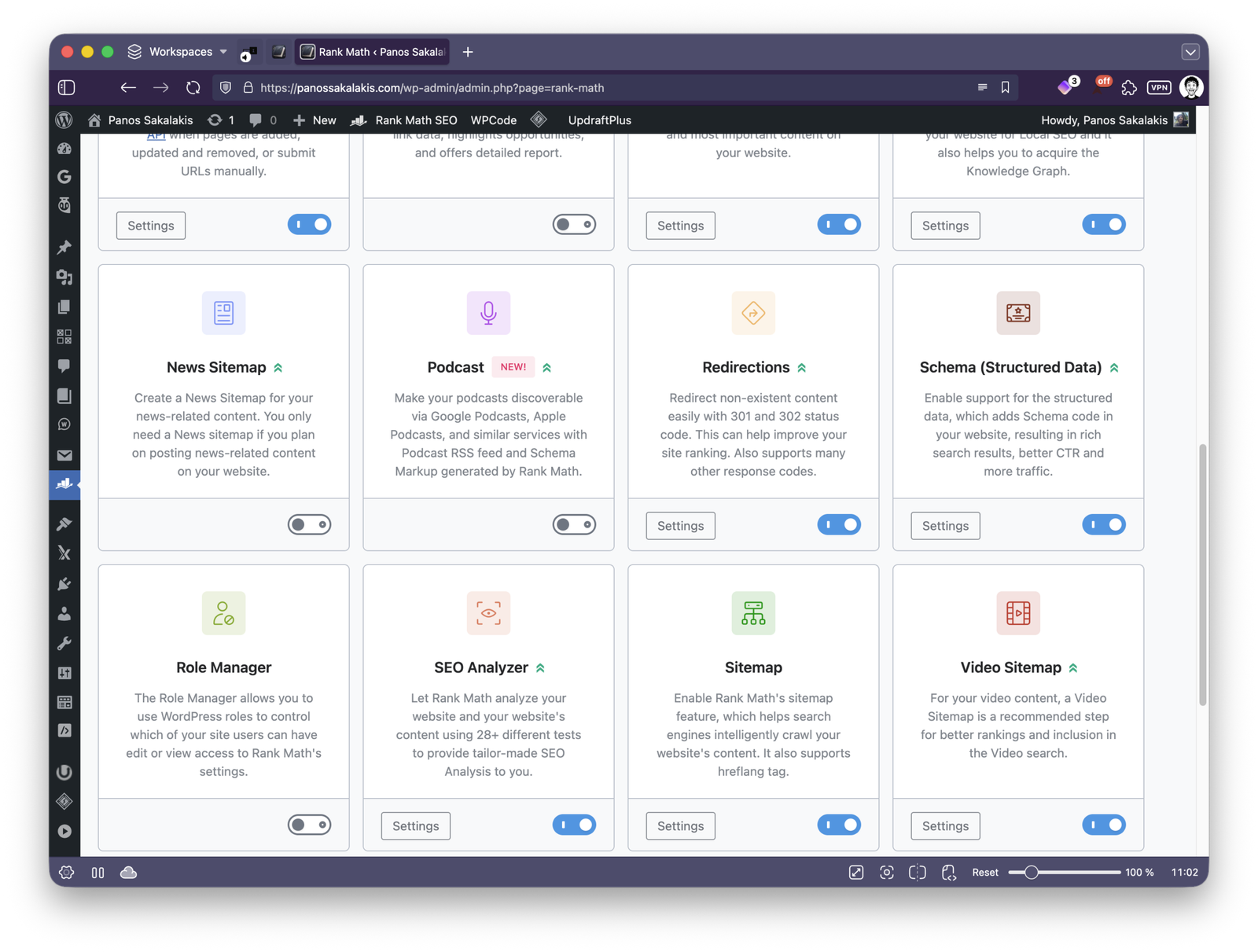
Rank Math SEO has tons of options, but that doesn’t mean you need all of them. Some are designed for e-commerce sites, others for local businesses, and the list goes on. For that reason, they included all the modules that, once enabled, give you access to their unique features.
Whenever you activate a module, you’ll see its ‘Settings’ button, where you can configure it even further. Again, keeping the default settings is completely fine. Rank Math will also try to detect if you’re using a plugin that’s compatible with it, and it will automatically enable the right module (like the ‘WooCommerce’ module when you have the plugin installed and activated).
Take the time to see all the modules and their settings. This is the first place you start, where all your site’s basic optimizations lie.
Optimizing your posts, pages, and custom pages

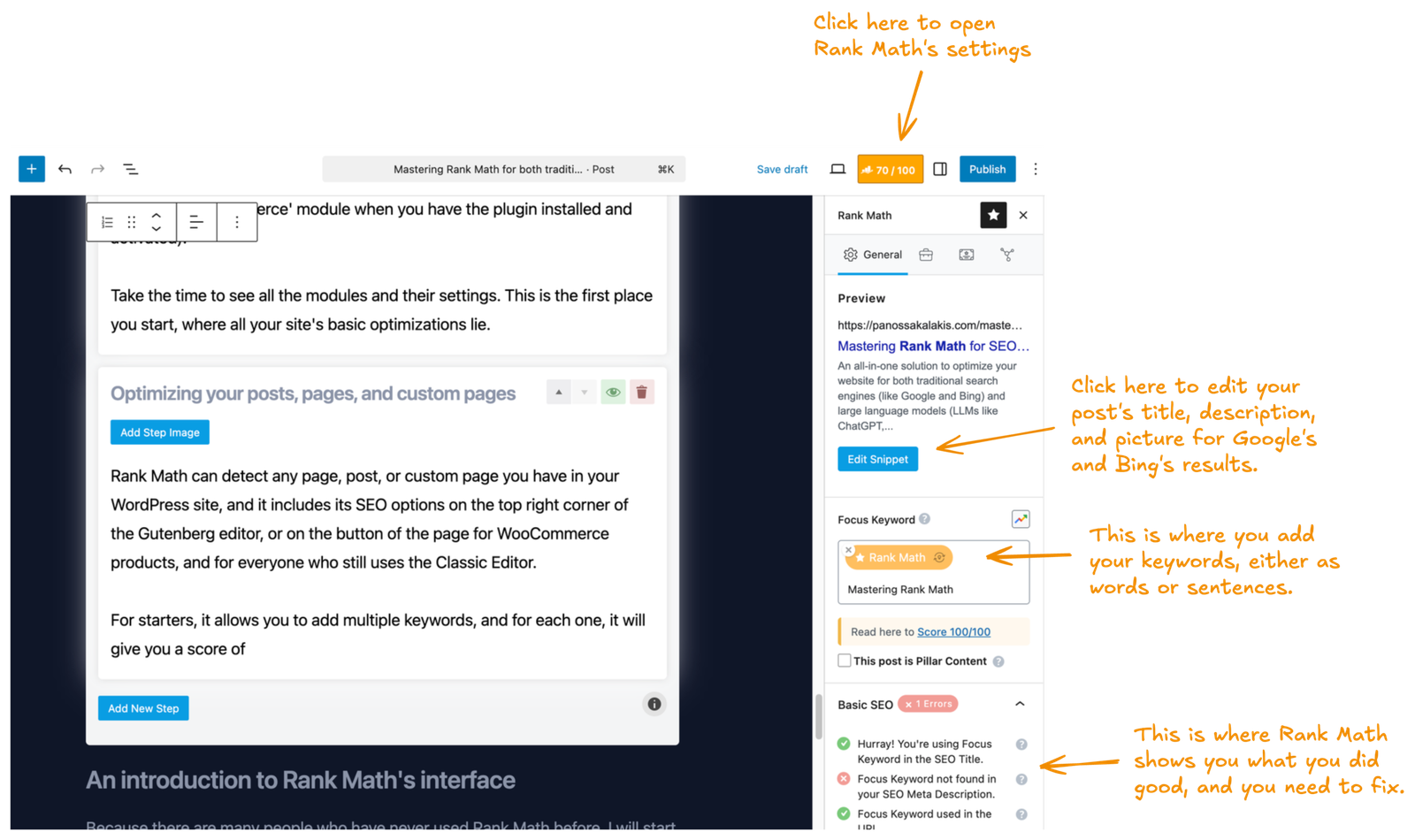
Rank Math can detect any page, post, or custom page you have in your WordPress site, and it includes its SEO options on the top right corner of the Gutenberg editor, or on the button of the page for WooCommerce products, and for everyone who still uses the Classic Editor.
For starters, it allows you to add multiple keywords, and for each one, it will give you a score of
An introduction to Rank Math’s interface
Because there are many people who have never used Rank Math before, I will start with the first pages you’ll see once you activate all of its features and settings.
The ‘Modules’ page
As I mentioned earlier, this is the place where you start. By default, Rank Math won’t enable all the modules, so it’s important to take a look and decide which ones you want to use and which you don’t.
Here are all the Modules you’ll find available right now:
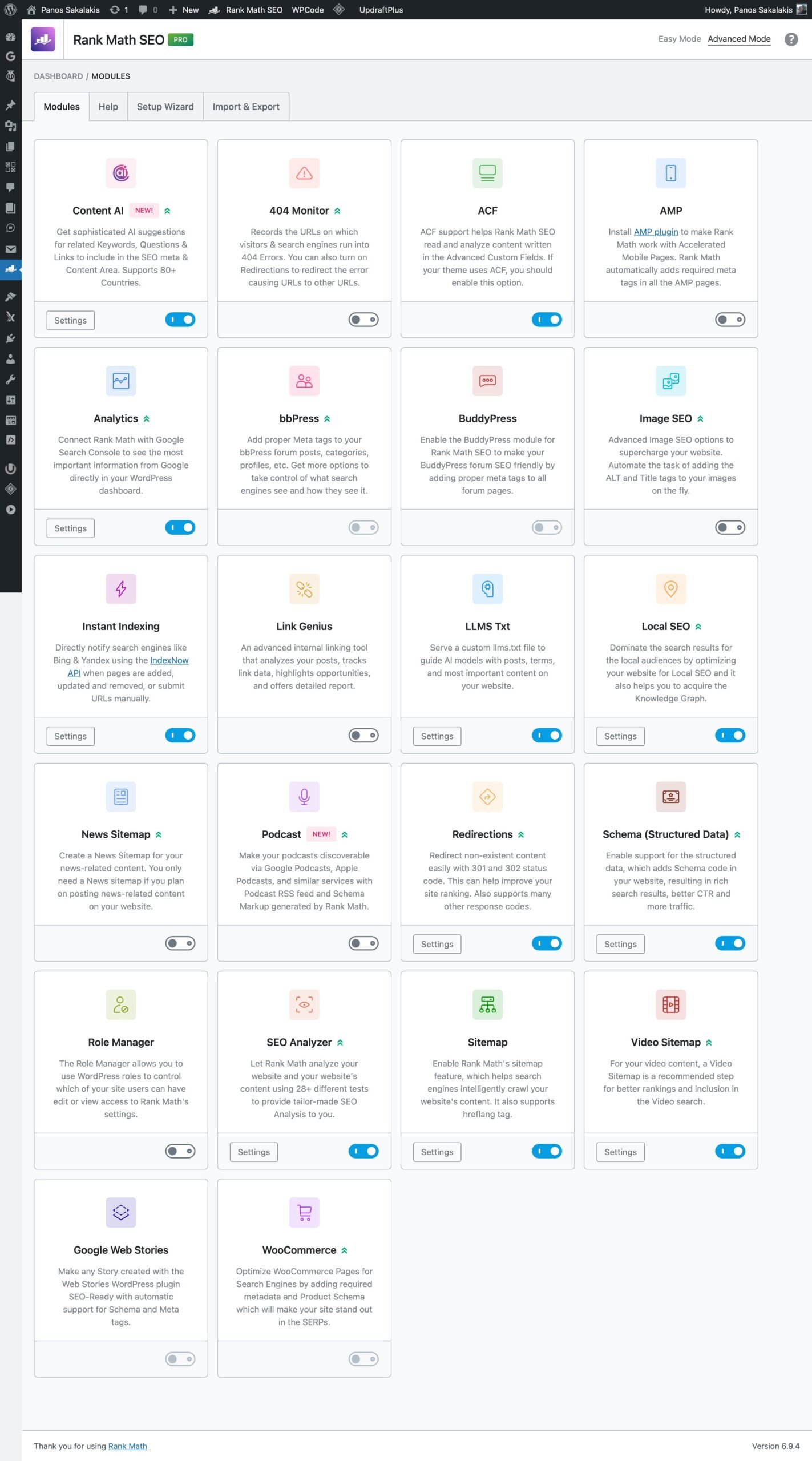
In the screenshot above, as you can see, I haven’t activated the “Image SEO” module because all the images I’ve uploaded have already been optimized. But if you have a website with thousands of images, you can enable it and optimize it to automatically add the right information to them.
Finding and adjusting all settings
Finding and exploring through all that Rank Math has to offer is as easy as hovering the ‘Rank Math SEO’ option in the left sidebar.
That’s where you’ll see the ‘Dashboard‘, ‘General Settings‘, ‘Titles & Meta‘, ‘Sitemap Settings‘, ‘Schema Templates‘, and more.
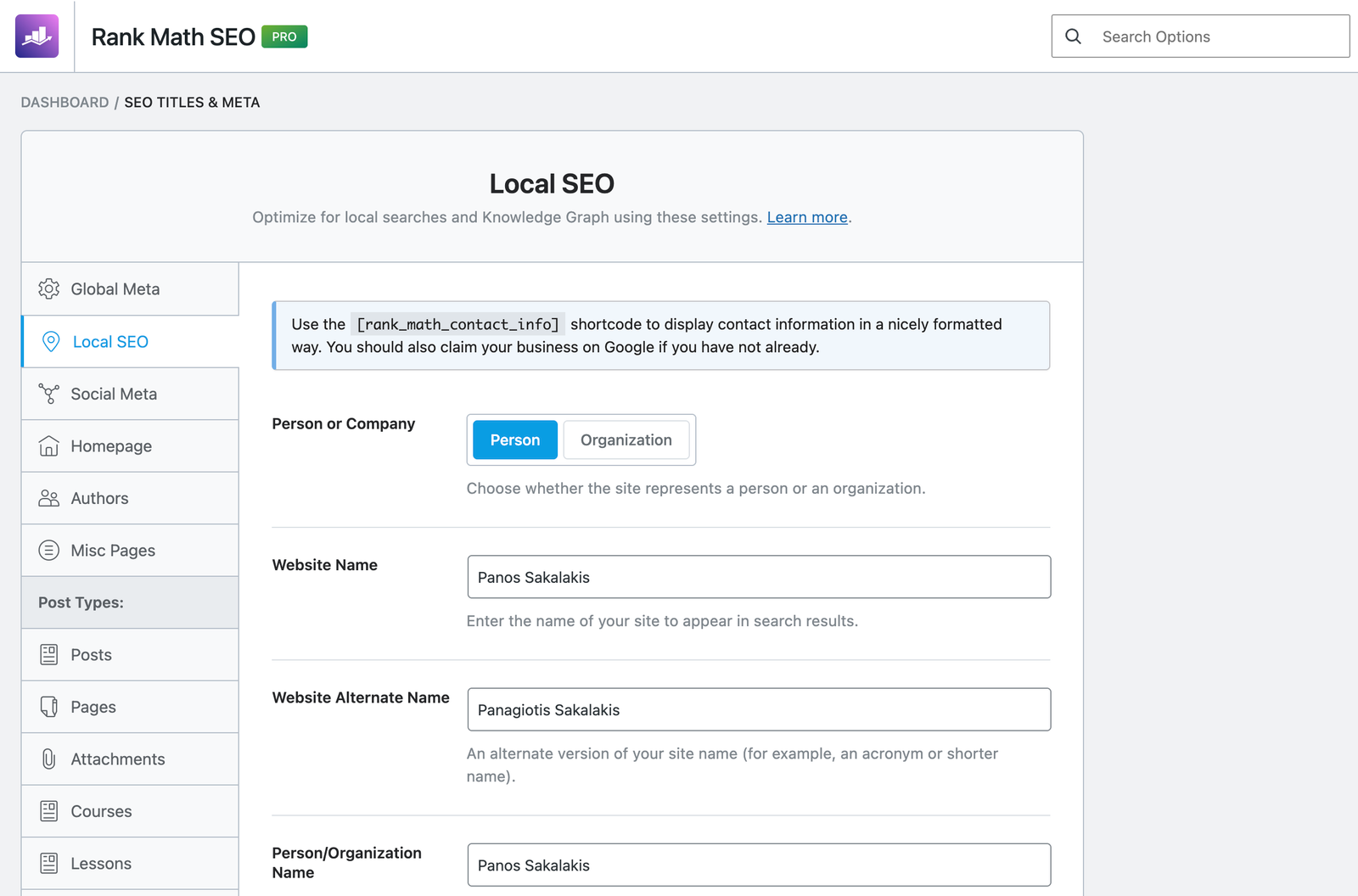
Go through each page and its sections, and make sure you’ve added all the basic information required for your website.
As you can see in the image above, if you visit the ‘Local SEO‘ section, you can choose between a ‘Person’ or ‘Organization’ (important for each purpose), and fields to specify the website’s and owner’s name, country and location, address and phone numbers for professionals and businesses, and more.
Using Rank Math’s blocks
Blocks, on the other hand, can be inserted into your posts or pages and make them even more robust than they were. For example, if you’re writing a guide or how-to section, you can insert the “HowTo” block by Rank Math and even adjust it to show the numbers for the steps.
This will also automatically add the proper “Schema Markup” code that Google and Bing require to better understand and index your content.
There are blocks for creating tutorials, FAQ lists, displaying recipes or product reviews, podcasts, videos, and so many others. You can easily create any Schema Markup just by selecting one from the list, and that’s a very good way to quickly optimize and improve most of your content.
To add a block, simply click the “+” icon in your editor to add a new block, and search for ‘HowTo‘ or ‘FAQ‘.
Here’s what it looks like once added:
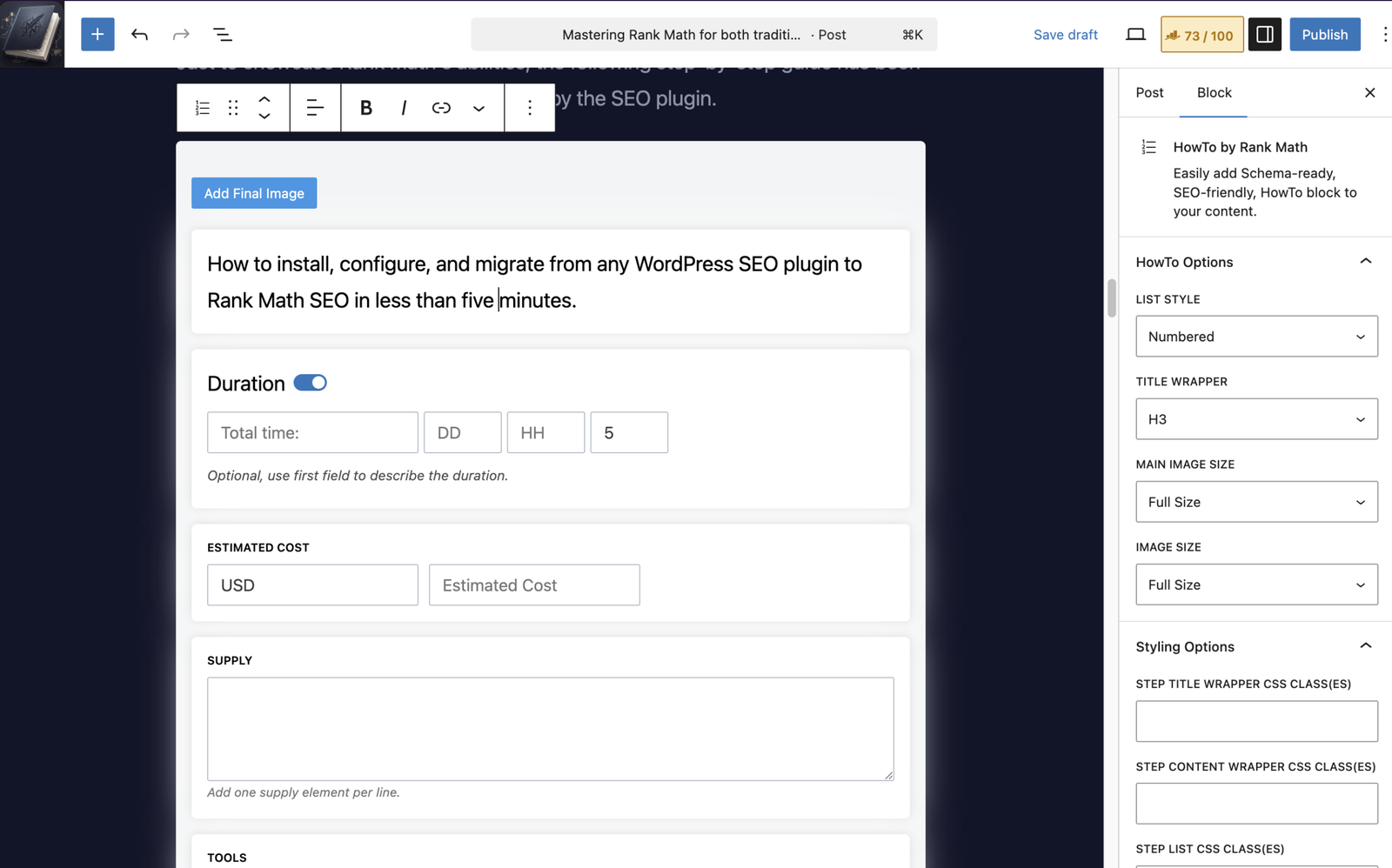
For the ‘HowTo’ block that can be seen above, you can add the main text and headings straight from within the block, and customize it even further from its settings on the right side panel.
The overall page/post SEO score
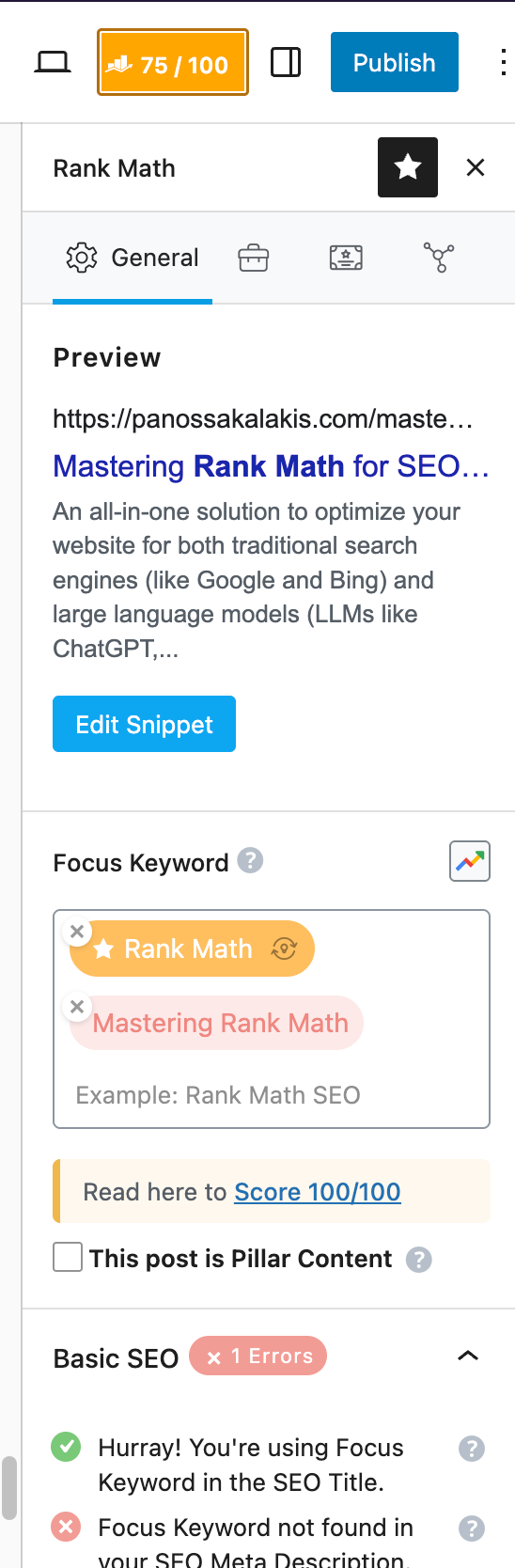
Then again, whenever you create a post or page, Rank Math will display a list of all the things that you can correct to make your content more friendly, giving you a total score from 1 to 100.
I wouldn’t take the score too seriously, though, because if you feel that your content is well-structured and exactly as it should be, go ahead and publish it.
I have content that has a 48/100 score and still ranks on the first page as the first result. The score is purely to help you understand the basics, not optimize your content for bots only.
Apart from the basic SEO suggestions, Rank Math will also display a list of things you can do to improve your title and content readability for each page or post, along with additional recommendations.
Now, keep in mind that those are simply suggestions and may differ for every website depending on its purpose and needs. In other words, you’re not required to make sure that every single one is fixed if it doesn’t match your content or changes your writing style more than it has to.
Creating our own custom Schema markups
This is a feature that it won’t be over and made me take the PRO version straight from the very beginning. It simply solves the most critical issue that most non-technical people face: automatically taking care of all the code behind, while you just fill out a few basic fields.
If you go to Rank Math SEO -> Schema Templates, you can create as many custom Schema templates as you want, all designed for your content’s needs and requirements.
Just click on the “Add New Schema” button, and you should see the ‘Schema Generator’, as seen below:
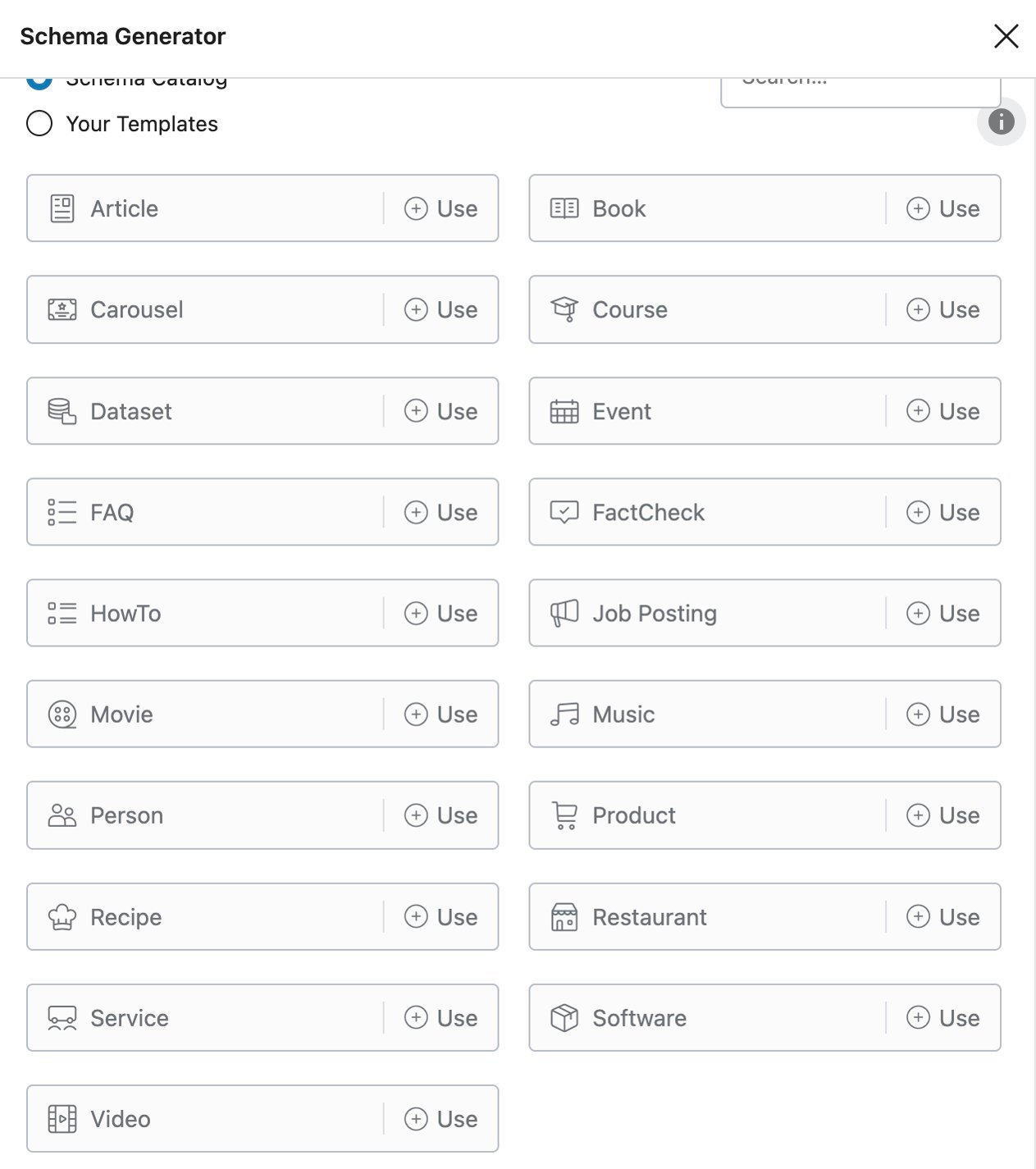
This is where you either choose one of the pre-made templates (which you can adjust in many ways), create your own custom Schema Markup template, or even import one from a file or a URL.
The fun thing about pulling the Schema Markup template from a competitor’s page will never stop amazing me. It litarelly solved all the problems I had when I couldn’t understand how some competitive sites were displaying their results in such a professional way.
You can then import any Schema Markup template that you’ve made into any post or page, and adjust it accordingly. For most people, there’s no reason to create a custom Schema Markup template, as Rank Math already offers the general types of Markups most people will use – but it’s always good to have the option.
How to use Rank Math SEO as an author
I’ve started this website to share my personal journey of becoming a full-time author, and everything I’m going through while writing my first sci-fi novel. So I wouldn’t skip authors here.
1. Create a proper “About” page

Let’s start from the basics, shall we? If you haven’t already, you need an ‘About‘ page, and this is the one that we’ll be submitting everywhere. This is the page where we’ll be sending everyone who wants to know more about us and our work as authors.
Each time I ask an AI chatbot to tell me who Panos Sakalakis is, they always take most of their information from my about page, which is what they also link.
Of course, you can optimize the ‘About’ page even further using Rank Math. Apart from adding your keywords and watching out for critical suggestions the plugin offers, make sure you’ve added the proper Schema Markup.
2. Establish your name (vital for all SEO, GEO, and AEO)
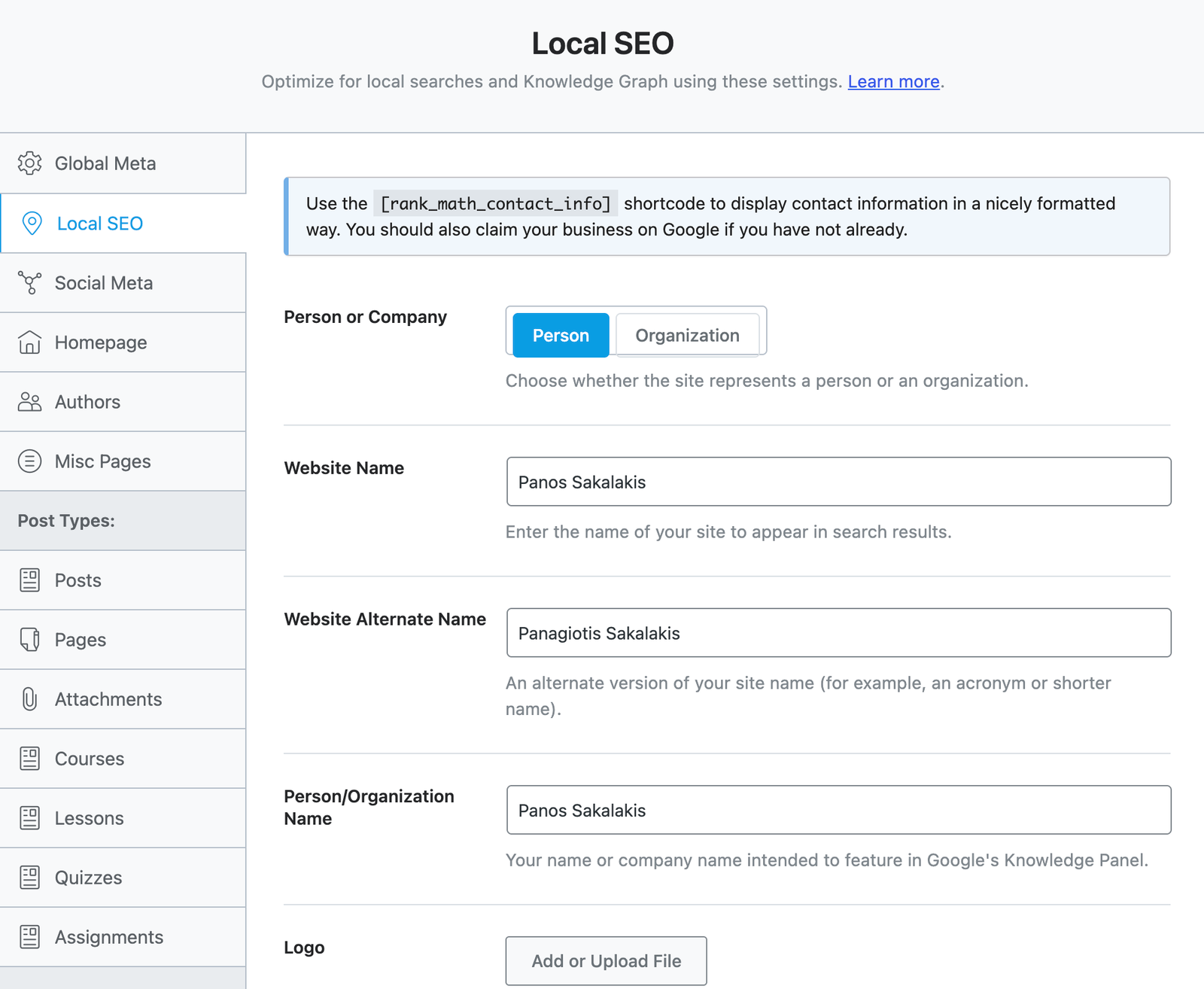
The first thing that you need to do is to make sure that, every time a bot visits your website’s content, it knows who owns it. AI large language models like Perplexity, ChatGPT, and even Google’s AI Overviews don’t just read the text; they also map the relationships between your pages.
With Rank Math, it only takes a few seconds to make sure that your name is there, visible for anyone who searches it. Just go to Rank Math SEO -> Titles & Meta -> Local SEO, and make sure the “Person” is selected and that your first and last name (along with your allies, if you have one) are filled.
On the same page, make sure that you’ve submitted your ‘About‘ and ‘Contact‘ pages, too.
3. Complete your WordPress profile
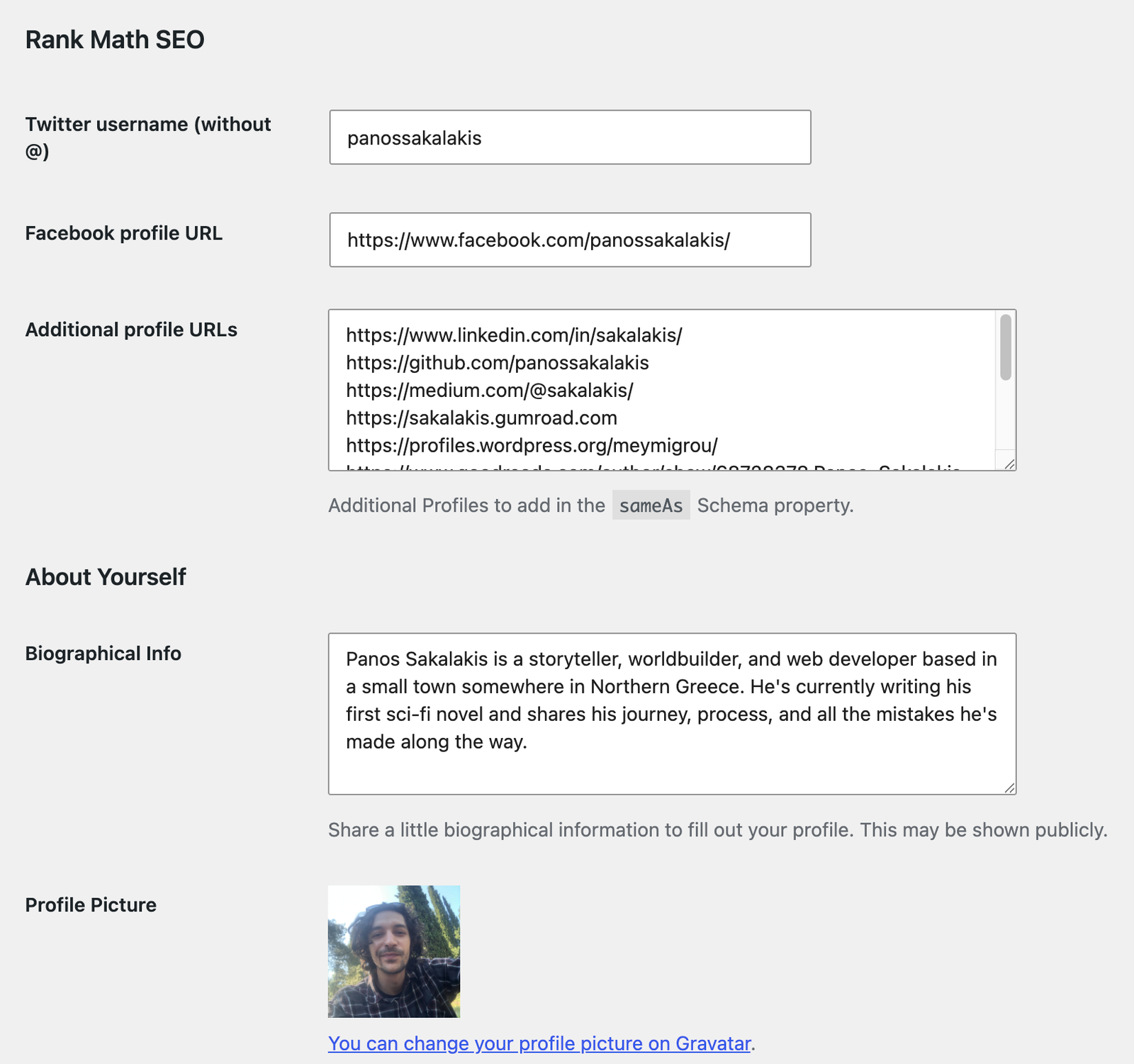
Add all the information that’s needed in your user account, too. From the WordPress Dashboard, just click on your profile’s image and name on the top right corner, and fill out everything there is to know about you.
Make sure your first and last name are being displayed right through the site, and add a description, your social media links, and optimize them even further at the end with Rank Math.
In the “Additional profile URLs,” make sure to include all the links from any social media platform you’re active on, or even websites like IMDb, GitHub, and anything that’s important for you.
4. Use the ‘Book’ Schema Markup
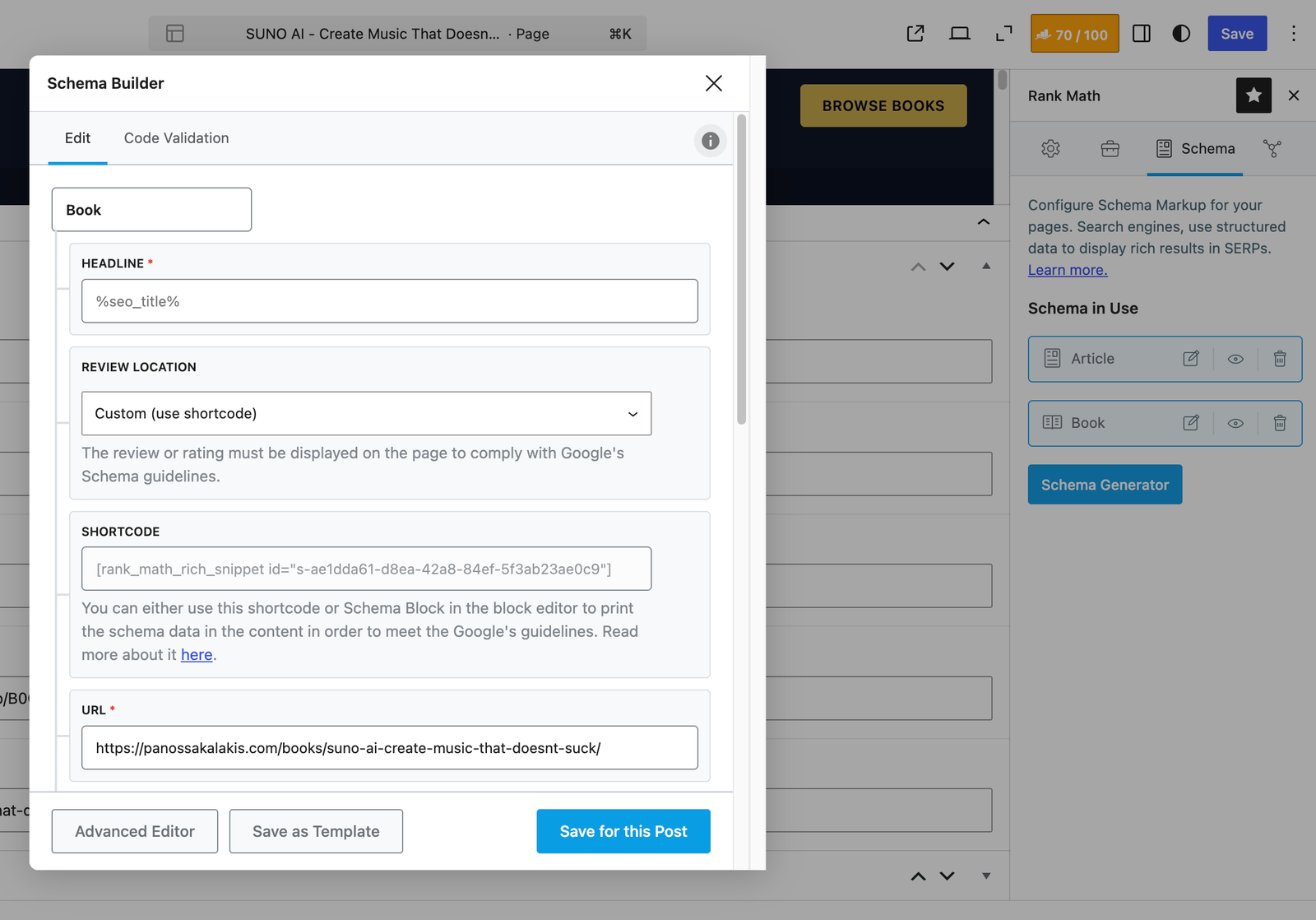
As an author, you’ll most likely create individual landing pages for each of your books. WordPress and Rank Math, by default, will place the ‘Article’ Schema Markup, which is the ideal one for pages. But you can go one step further and add the ‘Book’ Schema Markup, which will tell search engines that this is not another generic blog post or page, but rather, a book.
Rank Math allows you to fill in important details about your book, such as the ISBN, author name, publisher, date published, edition, and more. Make sure that everything is filled correctly, and allow search engines a bit of time to see and display your books in more and better ways.
For the same Schema Markup, you can also include reviews with star ratings from critics or readers, which is a cool way to also display them in Google’s search results.
5. Optimize your book covers and visuals
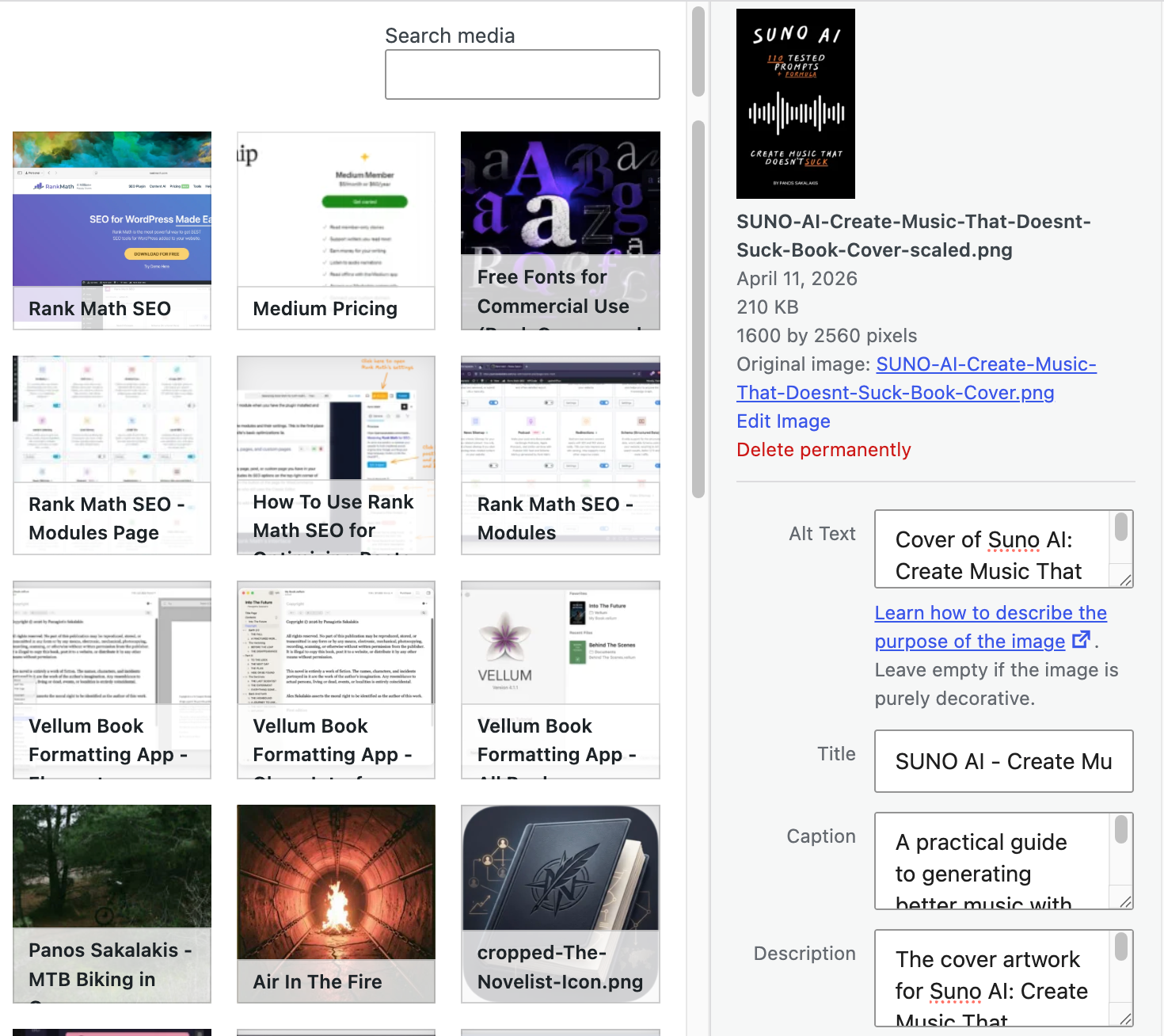
As an author, you want people to see your book’s covers and visuals with the highest and best possible quality, but it doesn’t matter how good your covers are; nobody will see them from Google or Bing if you haven’t optimized them properly.
Note: This is useful for people who have already uploaded many images, but they haven’t optimized them properly.
To fix that, the only thing you have to do is enable the Image SEO module in Rank Math, and configure it (if you want to) to automatically add missing ALT attributes and Title attributes on the fly using variables like %title% or %filename%.
6. Make internal linking easier than ever before
A common issue for authors is “orphan pages“, which means leaving older short stories, older books in a trilogy, or past blog updates unlinked from newer content. Rank Math SEO has two great features called AI Link Genius and Link Suggestions that are designed to basically put internal linking on autopilot.
Each time you write a new update or book announcement, look at the Rank Math meta box to see a list of relevant past posts it suggests you link to. You need to focus on building a web of internal links that are all relevant and useful for any reader who wants to go deeper into your site.
Before you leave
While Rank Math has been designed for non-advanced folks who want to optimize their sites without too much fuss, it still comes with a learning curve, and making sure that you take the time to learn how to properly use it is crucial.
The plugin’s configuration can improve and significantly increase your site’s traffic, but it can also completely remove it from everywhere if you make the wrong changes. Thankfully, every single option or question that you may have, Rank Math’s team has most likely already posted a solution/answer to their official Knowledge Base.
Let me know which SEO plugin you are using by voting down below: